
QutritLogic Qommander

v0.16.1 · Freeware · Linux

Qommander

A keyboard-driven file manager with two panels side by side. It's built on the ideas of the classic two-panel file managers I've used for years: I hand-picked the features I like most from several of them, and added my own where I wanted more, such as verified copies and an audio quick view that shows, plays and measures WAV files and other audio. Free, for Linux.

  • Linux Ubuntu · Mint · Debian · Fedora · Arch, 64-bit
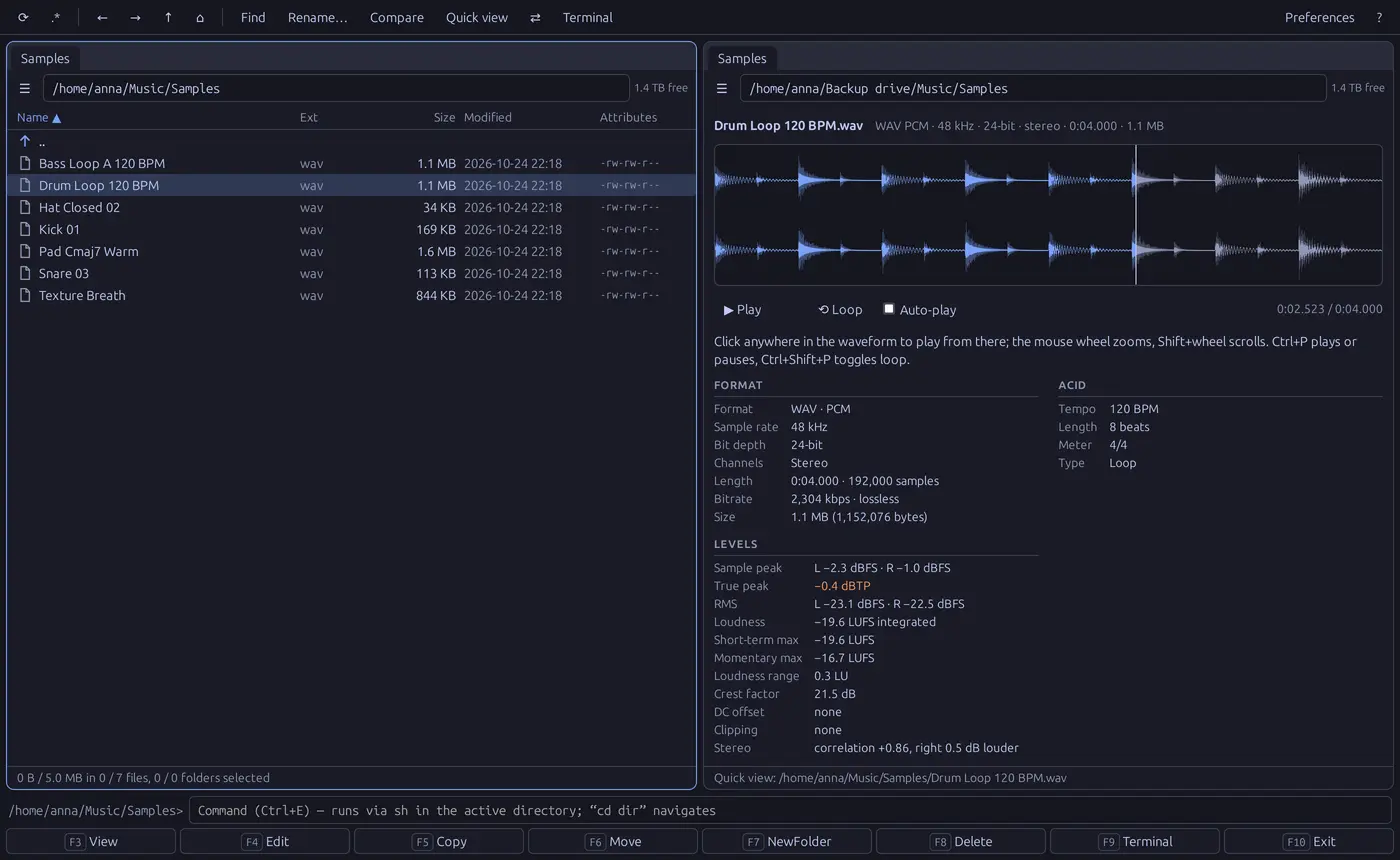
Qommander with a folder of samples on the left and quick view on the right: the waveform of a drum loop, partly played, with its format, ACID tempo and levels such as sample peak, true peak and loudness in LUFS.

Features

Audio quick view

See and hear your samples without opening them

Move the cursor over a WAV, AIFF, FLAC, MP3, Ogg, Opus or M4A file and the other panel shows its waveform, one lane per channel. Click anywhere to play from there, loop seamlessly, zoom with the mouse wheel down to single samples, or turn on Auto-play to audition a folder of samples with the arrow keys.

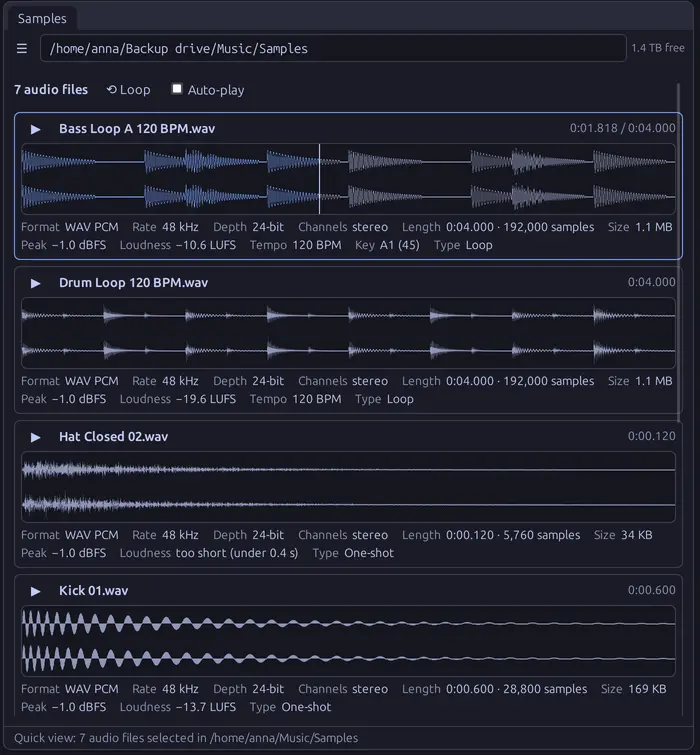
Select several files and they're stacked, one plays at a time, each with its format, length in samples, peak and loudness in LUFS, and the tempo, key and loop type that samplers write into the file.

Several samples stacked in quick view: a bass loop being played, a drum loop, a hi-hat and a kick drum, each with its waveform and a line of details such as 48 kHz, 24-bit, peak and loudness.

Audio features

  • The file's real sample rate and bit depth, exact length in samples, bitrate, VBR/CBR, encoder and gapless delay for MP3
  • Sample peak and true peak, RMS, integrated loudness (EBU R128), short-term and momentary maximum, loudness range, crest factor
  • Clipping, DC offset, stereo correlation, silence at the ends, and 16-bit content padded to 24 bits
  • Tags, ACID tempo and root note, sampler loop points, Broadcast WAV originator, date and timecode

Copy features

  • Verify after copying with xxHash3, SHA-256 or BLAKE3, read back from the disk, not the memory cache
  • Retries failed files, then skips them and carries on; they are listed with the reason and can be retried
  • Pause closes every file, so the drive can be used or unmounted; Resume continues interrupted copies
  • A queue per disk, a live speed graph and time left; moves delete the source only when everything arrived

Files and archives

  • Two panels with tabs, pinned tabs and history; virtualised lists that stay fast with 100,000 files
  • Open zip, tar, 7z, RAR and ISO files like folders: view, play and copy out; pack and unpack
  • Trash shared with the desktop; folder sizes; drag and drop; copy, cut and paste
  • Mount, unlock and eject drives from the Places menu, encrypted ones included

Find and organise

  • Find files by name masks and content, results as they come
  • Filter by file type or name; colour files by name, with colours that follow the theme
  • Multi-rename with counters, dates, search and replace and a live preview
  • Compare folders; popular folders, favourites and bookmarks; a command line and a terminal here

Made for the keyboard

  • Every command has a key, the classic F-key layout included; F1 lists them all, searchable
  • Quick search by typing, selection with Insert, Space and Shift+arrows, select by mask
  • 11 colour themes, zoom from 67 to 250 %, and a PDF user guide built in (Shift+F1)
  • Opens folders from Nemo's right-click menu, as tabs in the running window

Free: no price, account, licence key or ads; no telemetry and no network connections. Native app written in Rust with Tauri 2; made and tested on Linux Mint 22 with the Cinnamon desktop.

Download

Version 0.16.1, 25 October 2026.

Ubuntu, Mint, Debian

.deb

Ubuntu 24.04, Linux Mint 22, Debian 13 or newer, on a 64-bit (amd64) PC. Adds Open in Qommander to Nemo's right-click menu.

Download .deb

qommander_0.16.1_amd64.deb · 8.1 MB · SHA-256

SHA-2566434f96d2119a8ad2d3b1afbbe2ddb533c64840c08b5659ed5ff0745e85a5cdd

Other Linux

AppImage

Fedora 40, Arch, openSUSE Tumbleweed and other 64-bit distributions from 2024 on. One file that runs without installing.

Download AppImage

qommander_0.16.1_x86_64.AppImage · 87.7 MB · SHA-256

SHA-25624349a19313561767c4b959e6a0d51641d92dc2ee481b761570c0dbd24441165

Install on Ubuntu, Mint or Debian

Open a terminal in the folder you downloaded to and install the package. It upgrades an earlier version in place, including xcommander, its earlier name, and keeps your settings. Then start Qommander from your applications menu.

Run the AppImage

Make the file executable and start it; there's nothing to install. If it doesn't start, install FUSE 2 (libfuse2, on Ubuntu 24.04 libfuse2t64).

The first start

Qommander shows its disclaimer and asks you to accept it before you use it. For 7z, RAR and ISO archives, install the 7zip package.

User guide

Describes every feature, with screenshots, keyboard shortcuts and troubleshooting. 17 pages, PDF. The same guide opens in the app with Shift+F1.

Read the user guide

Free to use, at home or at work. Please share this page rather than the files. By installing Qommander you accept its licence and disclaimer: a file manager copies, moves and deletes files, so you use it at your own risk and keep your own backups. I take no responsibility for lost, changed or deleted files.

Release history

0.16.1

  • Copying to a USB stick (FAT, exFAT) no longer loses a file whose name differs from another only in upper and lower case, such as Readme and README: it's listed as not copied, and a move keeps it.
  • Renaming can't replace another file whose name differs only in case, and changing just the case of a name now works on USB sticks. Multi-rename can renumber files (img1 → img2 …).
  • A name typed in the copy or move dialog without a folder stays in the file's own folder.
  • Named pipes and other special files are skipped instead of stopping a copy.
  • Unpacking an archive can't place files outside the folder it unpacks into.
  • Find files ignores upper and lower case in å, ä, ö and other letters too.
  • The viewer scrolls with the arrow keys, Page Up/Down, Home and End.
  • Smaller fixes in quick view (waveform size, silent files) and tabs.
Earlier releases (0.15.0 – 0.16.0)

0.16.0

  • New name: xcommander is now Qommander. Installing it replaces xcommander and keeps your settings, tabs and favourites.

0.15.0

  • First public release.
  • Several audio files in quick view: select two or more to stack their waveforms, with format, peak and loudness under each; one plays at a time.
  • PDF user guide built in (Shift+F1); the disclaimer is shown on first start.
  • Copying or moving an archive file (zip, tar, 7z, ISO) with F5 or F6 copies it as a file again, instead of trying to unpack it.